
Tableau is a great tool.
Your analysts are producing insights daily.
But the system continues to grow.
Numbers are no longer matching.
Analysts are taking days to answer seemingly simple questions.
Why is this happening?
Often, it is because data modeling and business logic are defined directly in Tableau. Tableau is great for visualization but not as good for data modeling. This causes a variety of issues, including:
- Repeated calculated fields and data joins. The same logic is defined in multiple places. Difficult to handle transitional periods such as upstream API changes.
- Slow data queries and workbooks. Data transformations are generally faster outside of Tableau.
- Vendor lock-in. Keeping logic out of the BI platform makes your system more flexible.
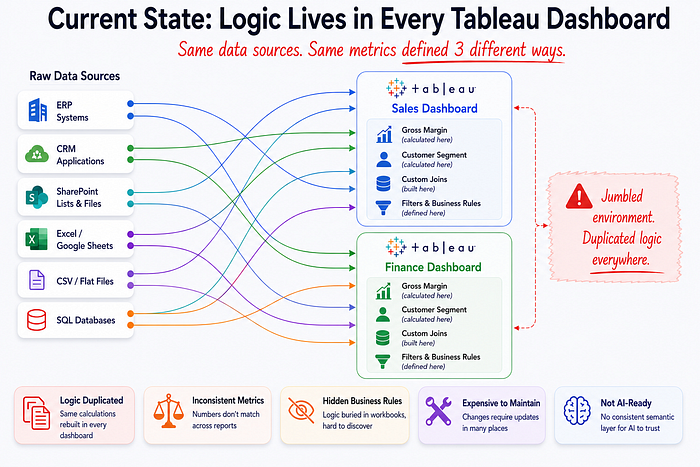
Migrating Tableau Environment to dbt
The solution is to move data modeling and business logic into dbt and use Tableau as the display layer. Here’s the basic architecture:
dbt project architecture and example files
- Raw Data —
sales.csv - Staging —
stg_sales.sql - Business Logic —
sales_dashboard.sql - Metadata & Testing —
_marts_models.yml - Semantic Layer —
sales_dashboard.yml - Visualization Tableau workbook
To do this, we need to untangle the mess that is data modeling in Tableau. But the great news is the visuals shouldn’t actually change. And these infrastructure and architectural improvements provide a series of cascading benefits.
Benefits
- Validation of the numbers. Re-creating the existing logic often uncovers hidden assumptions and bugs in the existing system.
- One source of truth. Consistent and reliable metrics across the org.
- Cheaper compute costs. Less duplication and better usage of pre-aggregated datasets.
- Higher quality data for AI applications. Models are most effective when they have access to well-defined business concepts.
Steps to migrate to dbt
- Create a prioritized inventory of Tableau workbooks to move.
- Create an inventory of data sources used in those Tableau workbooks and ensure they are in the data warehouse.
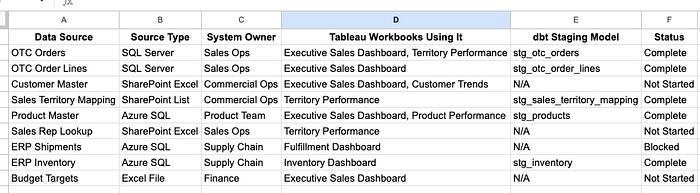
- Identify data transformations currently in Tableau and create equivalent dbt logic.
Example
In this section, we’ll go through an example of how to move basic logic from Tableau into dbt. We will show how to migrate a join and a calculated field.
The full project is available on GitHub: github.com/MattBrown88/tableau_dbt_demo
Join
Joining productand customer reference tables to sales_data.
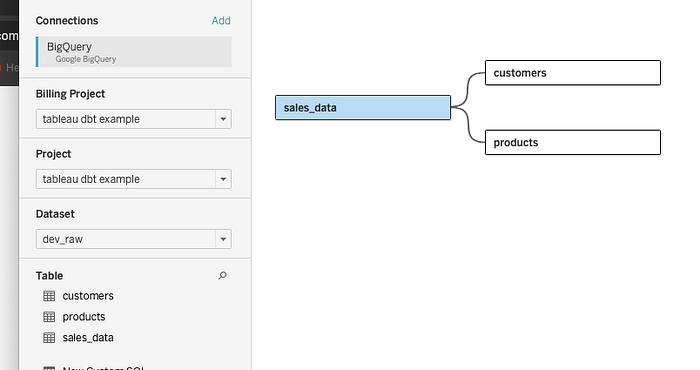
Create a calculated field in Tableau
Calculated Field
Here’s a calculated field in Tableau. By defining it in a Tableau workbook, it’s not available in other workbooks or anywhere else in the org. So reuse will result in duplication.
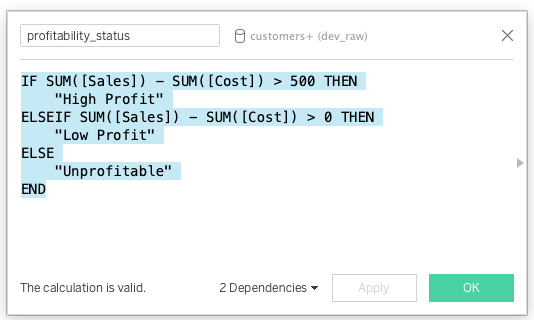
We can move this logic to dbt so that it is documented and readily available. This is a simplistic example but if you’re here, you understand that Tableau data modeling can quickly become unmanageable.